A project harness for working with AI that compounds on what you build.
It keeps what you decide, so each AI session builds on the last and the whole product gets built. It began as a scaffolding CLI and grew into a framework, investigation tools and an app.
Starting is one sentence. The app turns it into a north star with the problem, the audience and what comes first, then drafts the first initiatives and epics to build from.
A sentence becomes a north star and a first plan.
One sentence of vision is enough to start. It becomes a north star, then a first set of initiatives and epics.
AI builds fast and forgets what you decided. My first answer was a scaffolding CLI, and each fix to the last leak led to a way of working.
Every fix became the next container.
Seven ways I tried to keep the thinking while building with AI. Each one fixed the last leak, until the answer was to give the thinking a level of its own.
A way of working only compounds if an agent can repeat it. I turned it into commands and tools that any agent can call in any codebase.
Commands as repeatable tools for any codebase
Dropped into an unfamiliar repo, the useful questions are the same: what is this, what state is it in, what should happen next, and how do I explain it to someone who does not read code. I turned those questions into commands so the answer has a consistent shape every time.
prompt.md. Pick one.Translate the same technical topic for a specific audience in plain language.
Topic + audience, e.g. 'event-driven architecture for CEO'
Commands alone still drifted, because the plan lived in the same repo as the code. I lifted all planning above the project and made the project's files the source of truth.
Keep what you decide apart from what you build.
My thinking was locked inside the repo. Every plan, decision and half-formed idea sat next to one product's code, so the whole project could only ever be that one product.
Lifting the plan above the project. Planning and code shared a repo, so the plan inherited the code's history and changing either one dragged the other. It was already causing real errors: a reconciliation epic found an epic-numbering collision and a second desktop build. I refactored all planning above the project. Vision, context, planning and the inbox became a hub, and the code moved into deliverable repositories underneath it. ADR-001 records the rule that makes the split hold: the project's files are the source of truth.
The impact. The product became one data point, one experiment and one asset in a larger whole, and the hub can hold more than one. Since the split I can design again. I run experiments, make test repos and pivot whenever I need to, because each piece can change without dragging the other.
Here is how one idea moves through those zones.
The hand runs kept ending in the same three documents. One investigation now produces the roadmap, the audience briefs and the proposal together.
One investigation now produces the roadmap, the briefs and the proposal
Those runs kept ending in the same three things: a roadmap, briefs for each audience and a proposal. Each used to be written on the fly, so I made one pass produce all three, and now they agree with each other.
The engine covers 16 domains, 11 core and 5 for healthcare, at three depths: Sprint, Audit and Portfolio. One registry holds the domains, and the CLI, the agent tools and the browser all read it.
Code that can't leave the building needs the same checks. The investigation runs in Docker, and its findings are read in Evidence.dev.
On-prem, the findings are read in Evidence.dev
Code that cannot leave the building needs the same checks. A client asked for a version that runs in isolation, so I packaged the investigation in Docker, with a Taskfile as the one consistent way to run it.
Evidence.dev is the read surface, and it reads in the same order as the app: a run overview, then each finding with its code excerpt beside it, then the follow-up commands to copy and paste for a challenge, a re-run or a focused pass. The surface is read-only, so contesting a finding happens from the command line.
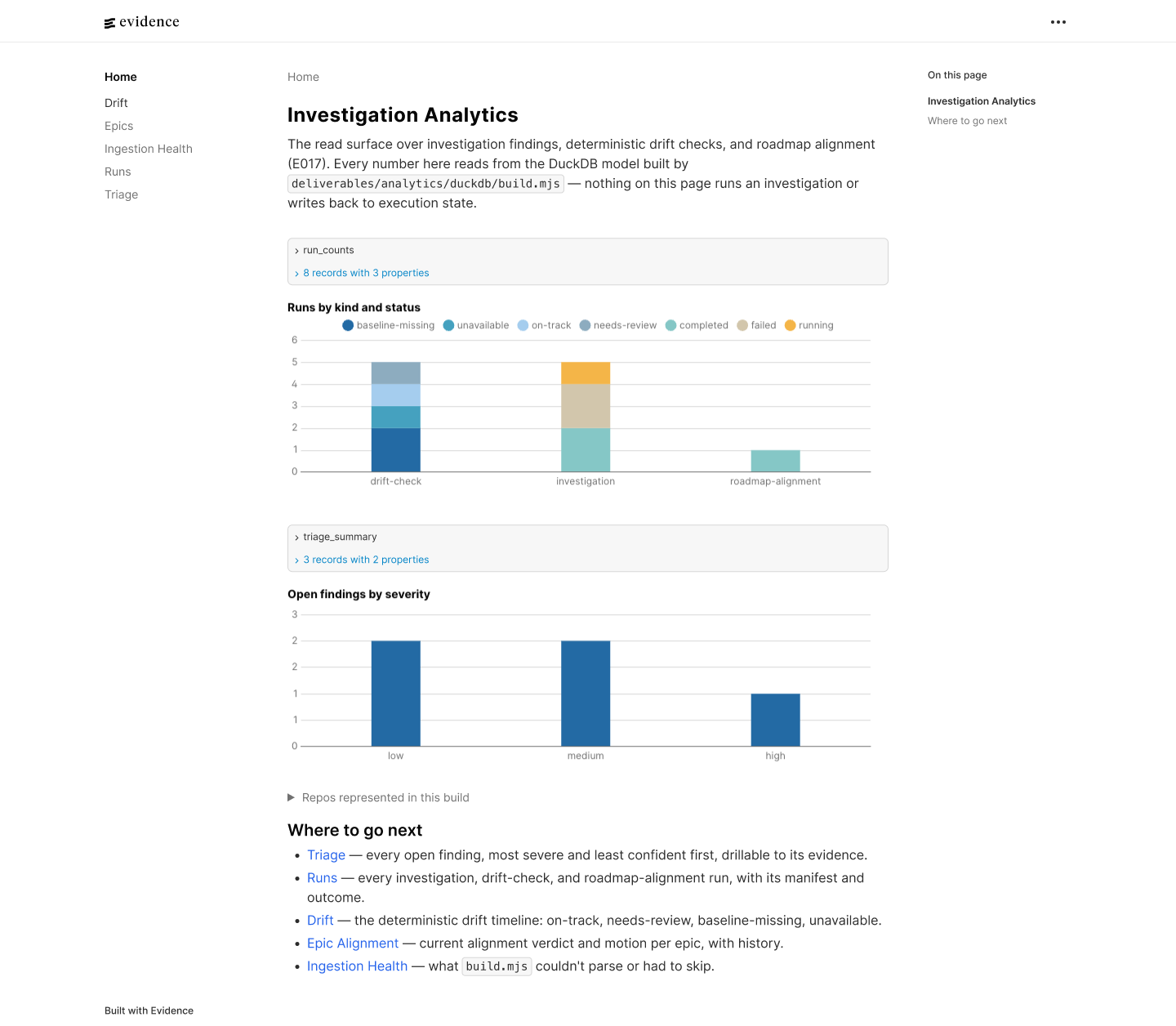
A read at the start is not enough, because a build wanders as it goes. Drift is watched as commits land and flagged against the plan, until each item is fixed or parked.
Drift is caught while you build, not after.
The plan stays the baseline. Commits are checked against it as they land, and drift waits in a queue until it is fixed or parked.
Most founders arrive with scattered material: documents, repos, one-shots, notes. The app reads it, asks a few questions as it goes, and builds the vision and plan from the answers.
Scattered material becomes a product vision and a plan.
Documents, repos and one-shots go in. The app asks questions while it reads, then builds the vision and the plan.
Once an agent works on a founder's real files, how much it asks first is a design decision, not a default.
How much should an agent ask before it touches your files?
In the app, the agent works on a founder's real files. The first thing beta testers hit is the agent proposing a change to a document, and that moment decides whether they trust it with the rest of the project.
Where it started
In my first packaged-build session I watched the agent draft documents through a modal dialog, one action at a time, with a raw tool name and its arguments on screen. There was no way to say "yes, keep doing that." That session set the brief: approvals should speak plainly, show up in the conversation, and learn what the person is comfortable with.
Design question: what should happen between "the agent wants to change a file" and "the file changes"?
Ask every time
Every write opens a prompt. Predictable and safe.Cost: it is the problem I started with. People approve without reading, which is worse than not asking.One global autonomy switch
"Ask for everything" or "never ask," like a mode toggle.Cost: too coarse. Nobody wants the agent rewriting deliverable code with the same trust they give a meeting note.Permissions by kind of change, in the thread
Plain-language kinds, three scopes, and every automatic action still shows up as a line in the conversation.Cost: a small permission model to design, explain and keep revocable.Why C. The risk of a change depends on what it touches, not on how often it happens. Grouping by kind lets me be generous with low-risk work (documents, plan updates) and stay strict with high-risk work (deliverable code), and the person can read that choice in everyday words.
Settings · Saved permissions · this project
Not every project starts clean. Raw notes, features and bugs are sorted into a vision, features, fixes and the next build, and the app asks what that build should deliver.
A project already in motion joins midway.
A project already underway is read and sorted, so the next build is decided from what exists.
Ideas arrive in meetings and get lost. Each one is checked against the north star and the work that exists, then returns as a hypothesis you decide whether to keep.
Meetings become hypotheses the project can test.
A call yields ideas. Each is checked against the north star and the work that exists, and the ones that connect become hypotheses to keep or drop.
A project moves when it is clear what it still lacks. A missing landing page or pitch deck finds its playbook, fills it with the project's own context and drafts the asset.
A gap in the north star finds its playbook and builds the asset.
A gap in the north star, like a missing landing page or pitch deck, finds its playbook. The playbook is filled in from the project and produces the asset.
The same project memory should serve every tool I build with. The hub connects to Cursor and others, so each one starts from the north star, the decisions and the next task.
The hub is the source of truth for every tool you build with.
The hub connects to the tools you build with, so each one starts from the north star, the decisions and the next task.
Everything above in one pass: read what exists, sort it, write down where it is going, and let that decide what gets built next.
From a one-shot to the next build.
The path every project takes through New Medium: read what exists, sort it, write down where it is going, and let that decide what gets built next.
- The one-shot
- The analysis
- The way forward
You built it with AI in an afternoon. Now what?
It looks done. Underneath, your best thinking is tangled up with things that could break.
A project harness where each AI session builds on the last. The plan, the commands, the evidence and the app all exist to keep what you decide.
New Medium is live. See what it does and start with the free Kickoff Kit.
Visit newmedium.dev